Auto Whisk 이미지생성 자동화
Google Whisk에서 프롬프트 일괄 생성, 자동화, 이미지 다운로드를 한 번에. 16개국 다국어 지원 | JSON 가져오기/내보내기 | 주제별 자동 파일명 저장
---
한국어 (전체 설명)
Auto Whisk Ultimate — Google Whisk 자동화 도우미
Google Whisk(labs.google)에서 AI 이미지를 대량으로 생성하고 관리하는 크롬 확장 프로그램입니다.
반복 작업을 자동화하여 창작에만 집중할 수 있도록 도와줍니다.
━━━━━━━━━━━━━━━━━━━━
주요 기능
━━━━━━━━━━━━━━━━━━━━
🚀 일괄 생성 자동화
여러 개의 프롬프트를 순서대로 자동 입력·제출합니다.
생성 간격(초)을 자유롭게 설정할 수 있습니다.
📝 프롬프트 구조화 입력
제목 / 프롬프트 / 피사체 / 장면 / 스타일을
구분자(===)로 나누어 한 번에 여러 작업을 등록하세요.
📂 JSON 가져오기 / 내보내기
작업 목록을 JSON 파일로 저장하고 불러올 수 있습니다.
반복 사용하는 프롬프트 세트를 팀과 공유하세요.
💾 자동 파일명 저장
생성된 이미지를 'autoWhisk' 폴더에
[주제]_screen1.jpg, [주제]_screen2.jpg 형식으로 저장합니다.
UUID 파일명도 자동으로 변환됩니다.
🌍 16개국 다국어 지원
한국어, English, 日本語, 中文, Español, Français,
Deutsch, Русский, Português, Italiano, Tiếng Việt,
ภาษาไทย, Bahasa Indonesia, Türkçe, ةيبرعلا, हिन्दी
🎨 공통 스타일 적용
모든 작업에 공통으로 적용할 스타일을 한 번에 지정합니다.
━━━━━━━━━━━━━━━━━━━━
사용 방법
━━━━━━━━━━━━━━━━━━━━
1. Google Whisk(labs.google/fx/tools/whisk) 접속
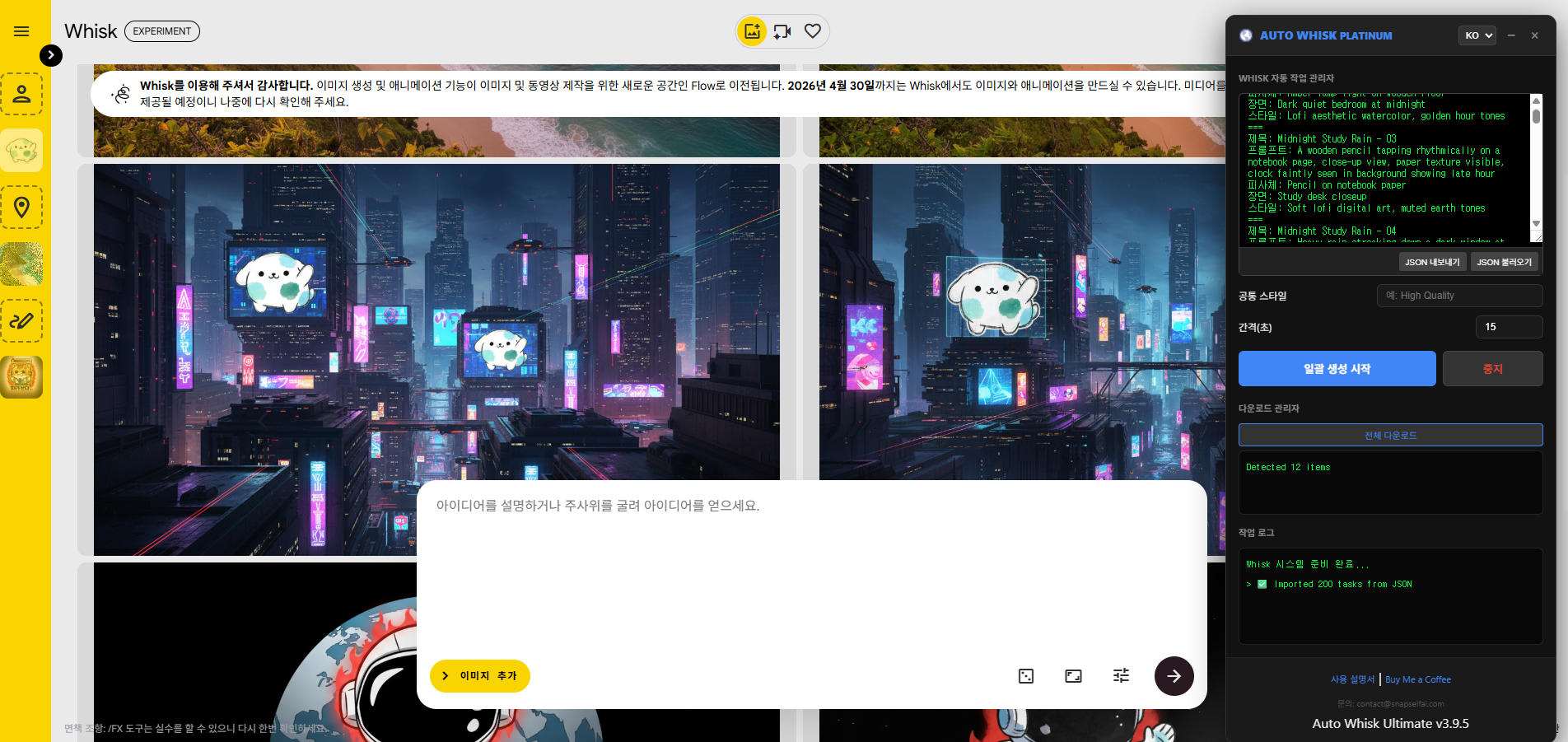
2. 우측에 Auto Whisk 패널 자동 표시
3. 프롬프트 입력 또는 JSON 불러오기
4. [일괄 생성 시작] 버튼 클릭
5. 생성 완료 후 [전체 다운로드]로 이미지 저장
━━━━━━━━━━━━━━━━━━━━
권한 안내
━━━━━━━━━━━━━━━━━━━━
• downloads : 이미지 파일 저장
• storage : 언어·UI 설정 로컬 저장
• host_permissions : Google Whisk 페이지 접근
수집하는 개인정보 없음 | 외부 서버 전송 없음
문의: contact@snapselfai.com
---
English (Short Description)
Bulk-automate AI image creation on Google Whisk. Batch prompts, JSON import/export, auto-rename downloads by topic. Supports 16 languages.
---
English (Full Description)
Auto Whisk Ultimate — Google Whisk Automation Assistant
Supercharge your Google Whisk (labs.google) workflow with bulk image generation, smart download management, and a fully multilingual UI.
━━━━━━━━━━━━━━━━━━━━
KEY FEATURES
━━━━━━━━━━━━━━━━━━━━
🚀 Bulk Generation Automation
Auto-submit multiple prompts in sequence.
Set a custom interval (seconds) between each task.
📝 Structured Prompt Input
Enter Title / Prompt / Subject / Scene / Style
separated by === to queue multiple tasks at once.
📂 JSON Import / Export
Save and reload your prompt sets as JSON files.
Perfect for sharing workflows with your team.
💾 Smart Auto-Rename Downloads
Images are saved to the 'autoWhisk' folder as:
[topic]_screen1.jpg, [topic]_screen2.jpg …
UUID filenames from Whisk are renamed automatically.
🌍 16-Language UI
Korean, English, Japanese, Chinese, Spanish, French,
German, Russian, Portuguese, Italian, Vietnamese,
Thai, Indonesian, Turkish, Arabic, Hindi
🎨 Common Style Field
Apply a shared style string to every task in the batch.
━━━━━━━━━━━━━━━━━━━━
HOW TO USE
━━━━━━━━━━━━━━━━━━━━
1. Open Google Whisk (labs.google/fx/tools/whisk)
2. The Auto Whisk panel appears automatically on the right
3. Enter prompts or import a JSON file
4. Click [Start Bulk] to begin automated generation
5. Click [Download All] to save images with clean filenames
━━━━━━━━━━━━━━━━━━━━
PERMISSIONS
━━━━━━━━━━━━━━━━━━━━
• downloads : Save image files to your device
• storage : Remember language & UI preferences locally
• host_permissions : Access Google Whisk pages only
No personal data collected. No external server transmission.
Contact: contact@snapselfai.com
--- Auto Whisk Ultimate — 사용 설명서
--- 한국어
---
시작하기
1단계 — 확장 프로그램 설치
Chrome 웹스토어에서 Auto Whisk Ultimate를 설치합니다.
2단계 — Whisk 열기
브라우저에서 labs.google → Whisk 메뉴로 이동합니다.
페이지가 열리면 오른쪽에 Auto Whisk 패널이 자동으로 나타납니다.
---
패널 구성
┌─────────────────────────────────┐
│ AUTO WHISK PLATINUM [언어▼] [−] [×] │ ← 헤더 (드래그로 이동 가능)
├─────────────────────────────────┤
│ 프롬프트 입력창 │ ← 작업 목록 입력
│ [JSON 내보내기] [JSON 불러오기] │
├─────────────────────────────────┤
│ 공통 스타일 : ____________ │
│ 간격(초) : [15] │
│ [일괄 생성 시작] [중지] │
├─────────────────────────────────┤
│ 다운로드 관리자 │
│ [전체 다운로드] │
│ 작업 로그 │
└─────────────────────────────────┘
---
프롬프트 입력 방법
입력창에 아래 형식으로 작업을 작성합니다.
작업이 여러 개일 때는 === 로 구분합니다.
제목: 고양이 일러스트
프롬프트: A cute cat sitting on a window sill
피사체: orange tabby cat
장면: cozy room, sunset light
스타일: watercolor painting
===
제목: 도시 야경
프롬프트: Cyberpunk city at night
피사체: futuristic car
장면: neon-lit street
스타일: digital art, 8K
┌──────────┬───────────────────────────────────┬───────────┐
│ 항목 │ 설명 │ 필수 여부 │
├──────────┼───────────────────────────────────┼───────────┤
│ 제목 │ 다운로드 파일명의 앞부분이 됩니다 │ 권장 │
├──────────┼───────────────────────────────────┼───────────┤
│ 프롬프트 │ Whisk에 입력될 주요 설명 │ 필수 │
├──────────┼───────────────────────────────────┼───────────┤
│ 피사체 │ 주인공 이미지 또는 설명 │ 선택 │
├──────────┼───────────────────────────────────┼───────────┤
│ 장면 │ 배경 이미지 또는 설명 │ 선택 │
├──────────┼───────────────────────────────────┼───────────┤
│ 스타일 │ 화풍/스타일 이미지 또는 설명 │ 선택 │
└──────────┴───────────────────────────────────┴───────────┘
---
일괄 생성 실행
1. 프롬프트 입력 완료 후 [일괄 생성 시작] 클릭
2. 자동으로 Whisk 입력창에 프롬프트가 입력되고 전송됩니다
3. 간격(초) 에 설정한 시간만큼 기다린 후 다음 작업으로 넘어갑니다
4. 중간에 멈추려면 [중지] 클릭
5. 하단 작업 로그에서 진행 상황을 확인할 수 있습니다
권장 간격: Whisk 이미지 생성에 보통 15~30초 소요됩니다.
---
공통 스타일
모든 작업에 동일하게 적용할 스타일을 입력합니다.
예) High quality, 4K, sharp focus
각 프롬프트 뒤에 자동으로 추가됩니다.
---
이미지 다운로드
생성이 끝나면 [전체 다운로드] 버튼을 클릭합니다.
- 저장 위치: 브라우저 기본 다운로드 폴더 → autoWhisk 폴더
- 파일명 형식:
고양이 일러스트_screen1.jpg
고양이 일러스트_screen2.jpg
도시 야경_screen1.jpg
...
Whisk 사이트의 기본 다운로드 버튼을 눌러도 동일하게 자동 변환됩니다.
---
JSON 기능 (프롬프트 저장·불러오기)
내보내기 — 현재 입력된 프롬프트를 JSON 파일로 저장
불러오기 — 저장해둔 JSON 파일을 불러와 바로 사용
반복 사용하는 작업 세트를 파일로 관리할 수 있습니다.
{
"whisk_tasks": [
{
"title": "고양이 일러스트",
"prompt": "A cute cat on a window sill",
"subject": "orange tabby cat",
"scene": "cozy room",
"style": "watercolor"
}
]
}
---
기타 기능
┌─────────────┬────────────────────────────────────────────┐
│ 기능 │ 방법 │
├─────────────┼────────────────────────────────────────────┤
│ 패널 이동 │ 헤더를 마우스로 드래그 │
├─────────────┼────────────────────────────────────────────┤
│ 패널 최소화 │ 헤더의 [−] 버튼 │
├─────────────┼────────────────────────────────────────────┤
│ 패널 닫기 │ 헤더의 [×] 버튼 (새로고침하면 다시 나타남) │
├─────────────┼────────────────────────────────────────────┤
│ 언어 변경 │ 헤더의 언어 드롭다운 (16개국) │
└─────────────┴────────────────────────────────────────────┘
------
Auto Whisk Ultimate — User Guide
---
English
---
Getting Started
Step 1 — Install the Extension
Install Auto Whisk Ultimate from the Chrome Web Store.
Step 2 — Open Whisk
Go to labs.google → Whisk in your browser.
Once the page loads, the Auto Whisk panel appears automatically on the right side.
---
Panel Layout
┌─────────────────────────────────────┐
│ AUTO WHISK PLATINUM [Lang▼] [−] [×] │ ← Header (drag to move)
├─────────────────────────────────────┤
│ Prompt input area │ ← Enter your tasks here
│ [Export JSON] [Import JSON] │
├─────────────────────────────────────┤
│ Common Style : ___________ │
│ Interval (s) : [15] │
│ [START BULK] [STOP] │
├─────────────────────────────────────┤
│ Download Manager │
│ [Download All] │
│ Logs │
└─────────────────────────────────────┘
---
How to Enter Prompts
Type your tasks in the input box using the format below.
Separate multiple tasks with ===.
Title: Cat Illustration
Prompt: A cute cat sitting on a window sill
Subject: orange tabby cat
Scene: cozy room, sunset light
Style: watercolor painting
===
Title: City Nightscape
Prompt: Cyberpunk city at night
Subject: futuristic car
Scene: neon-lit street
Style: digital art, 8K
┌─────────┬───────────────────────────────────────────────┬─────────────┐
│ Field │ Description │ Required │
├─────────┼───────────────────────────────────────────────┼─────────────┤
│ Title │ Becomes the prefix of the downloaded filename │ Recommended │
├─────────┼───────────────────────────────────────────────┼─────────────┤
│ Prompt │ Main description sent to Whisk │ Required │
├─────────┼───────────────────────────────────────────────┼─────────────┤
│ Subject │ Subject image or description │ Optional │
├─────────┼───────────────────────────────────────────────┼─────────────┤
│ Scene │ Background image or description │ Optional │
├─────────┼───────────────────────────────────────────────┼─────────────┤
│ Style │ Art style image or description │ Optional │
└─────────┴───────────────────────────────────────────────┴─────────────┘
---
Running Bulk Generation
1. Enter your prompts, then click [START BULK]
2. The extension automatically types each prompt into Whisk and submits it
3. It waits for the Interval (seconds) you set, then moves to the next task
4. Click [STOP] at any time to pause
5. Check the Logs at the bottom to monitor progress
Recommended interval: Whisk usually takes 15–30 seconds to generate an image.
---
Common Style
Enter a style string to apply to every task automatically.
Example: High quality, 4K, sharp focus
It gets appended to the end of each prompt.
---
Downloading Images
After generation is complete, click [Download All].
- Save location: Browser default Downloads folder → autoWhisk subfolder
- Filename format:
Cat Illustration_screen1.jpg
Cat Illustration_screen2.jpg
City Nightscape_screen1.jpg
...
Even if you use Whisk's own download button, filenames are automatically renamed the same way.
---
JSON Import / Export
Export — Save your current prompts as a .json file
Import — Load a saved .json file to use right away
Great for reusing your favorite prompt sets or sharing them with others.
{
"whisk_tasks": [
{
"title": "Cat Illustration",
"prompt": "A cute cat on a window sill",
"subject": "orange tabby cat",
"scene": "cozy room",
"style": "watercolor"
}
]
}
---
Other Features
┌─────────────────┬────────────────────────────────────────────────────────┐
│ Feature │ How │
├─────────────────┼────────────────────────────────────────────────────────┤
│ Move panel │ Drag the header bar │
├─────────────────┼────────────────────────────────────────────────────────┤
│ Minimize panel │ Click [−] in the header │
├─────────────────┼────────────────────────────────────────────────────────┤
│ Close panel │ Click [×] in the header (reappears on refresh) │
├─────────────────┼────────────────────────────────────────────────────────┤
│ Change language │ Use the language dropdown in the header (16 languages) │
└─────────────────┴────────────────────────────────────────────────────────┘
---
Contact: contact@snapselfai.com
Support: buymeacoffee.com/damuljumong
'인공지능' 카테고리의 다른 글
| 유니티(Unity) & 언리얼 엔진(Unreal Engine) 의 수익 모델 (4) | 2026.02.04 |
|---|---|
| 코멧 브라우저 베스트 프롬프트 TOP 20 (2) | 2026.01.27 |
| 내 얼굴이 애니메이션 주인공이 된다고?! DomoAI 미친 성능 실화냐? 🤯 (사용법+꿀팁) (1) | 2026.01.17 |
| "아직도 한 곡씩 만드시나요? 클릭 한 번으로 대량 생성하는 Auto Suno PRO 사용법" (2) | 2026.01.17 |
| 립싱크 인공지능,AI 애니메이션의 새로운 지평: AvatarForcing의 기술적 원리와 활용 (5) | 2026.01.17 |


